Release Notes for 5.2
Changes since version 5.0.03, released August 12, 2026.
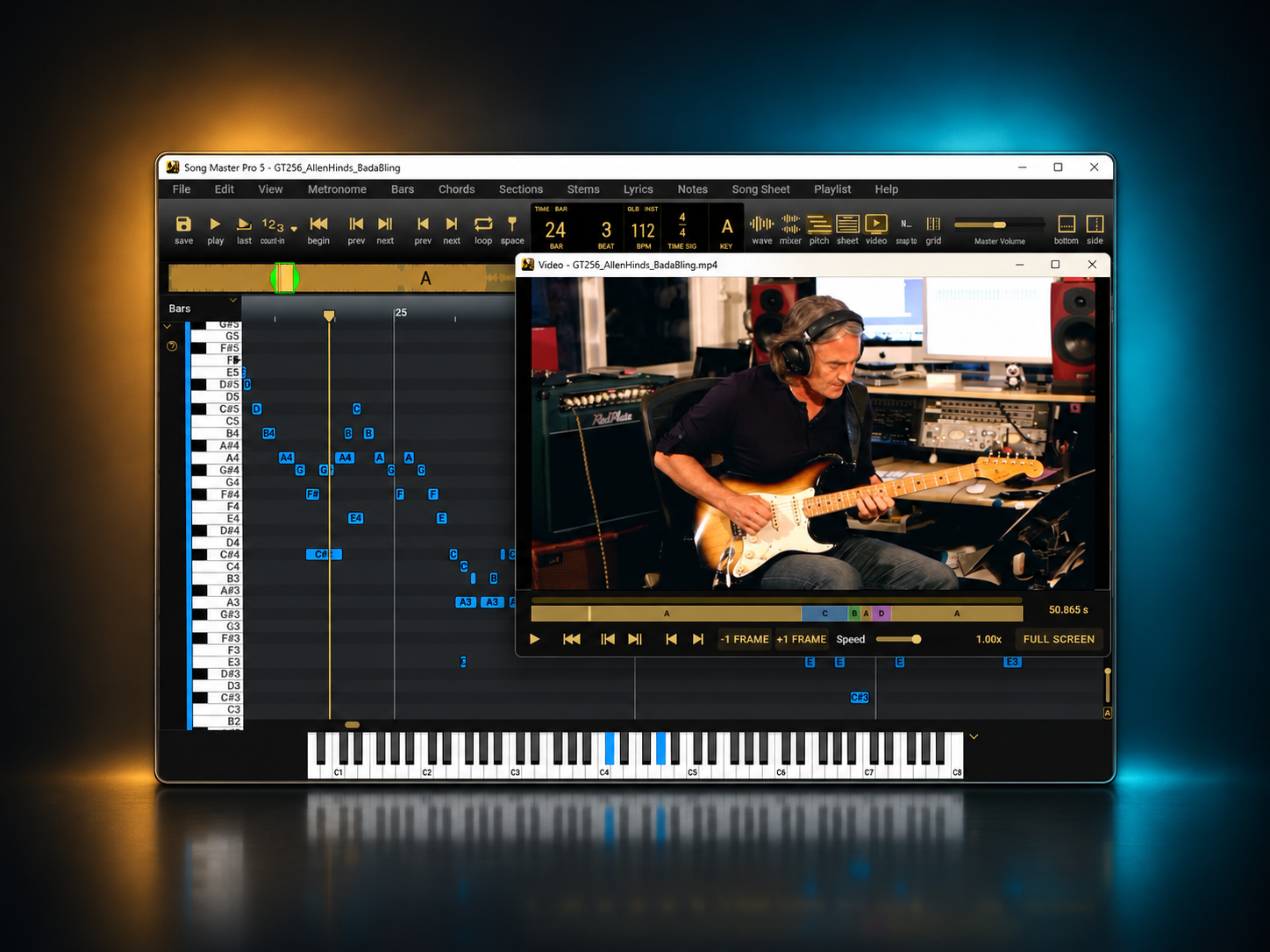
This update adds video playback, faster stem separation on supported GPUs, drum audio-to-MIDI, with improvements to beat timing, editing, and stability. Items marked [Pro] are exclusive to Song Master Pro; unmarked items apply to both editions.
Video playback
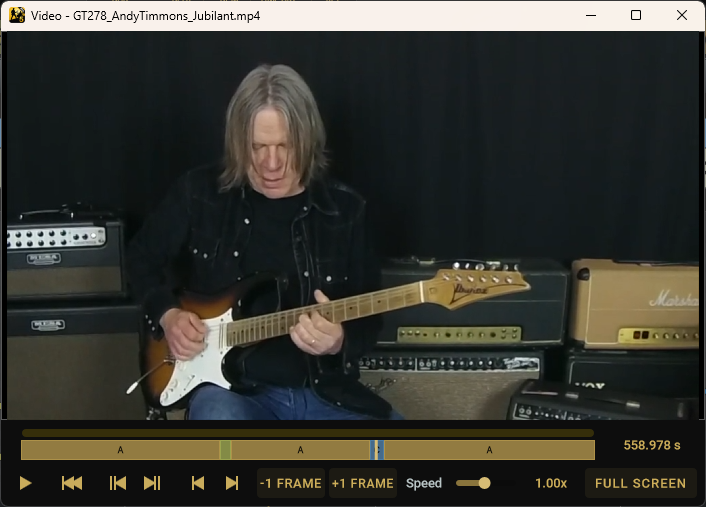
- Open video files and analyze their audio using Song Master's existing analysis and practice tools.
- Watch video in a synchronized player window with varying playback speeds, scrubbing, frame stepping, and full-screen viewing.
- Navigate by bar or song section, view sections on the video timeline, and adjust loop markers directly in the player.
- Open videos through the file browser, drag and drop, or playlists. A control-bar button shows or hides the video window, and each song remembers its window visibility, position, and size.
- Import videos up to 30 minutes long that contain a decodable audio track. Recognized containers include MP4, MOV, M4V, AVI, MKV, WebM, MPEG, and MPG, plus WMV on Windows. Actual playback and import depend on codec support provided by the operating system.
- Choose whether to Cache video audio in Song project in Settings. Enabled by default, this saves extracted audio for faster reopening and lets you work with the song's audio if the source video is unavailable. Turning it off prevents new caches from being saved; existing cached audio is retained.
Shortcuts Keys
| Action | Windows | macOS |
|---|---|---|
| Show or hide the video window — new | Alt + V | Option + V |
| Leave video full-screen mode — new | Esc | Esc |
| Fine scrub the video timeline — new | Hold Shift when starting a timeline drag | Hold Shift when starting a timeline drag |
| Play or pause with the video window focused | Space | Space |
- Fine scrubbing advances approximately one video frame per pixel of horizontal movement.
Faster stem separation
- Accelerate stem separation on macOS using native Core ML processing on the CPU and GPU, with models optimized for Apple Silicon and Intel Macs.
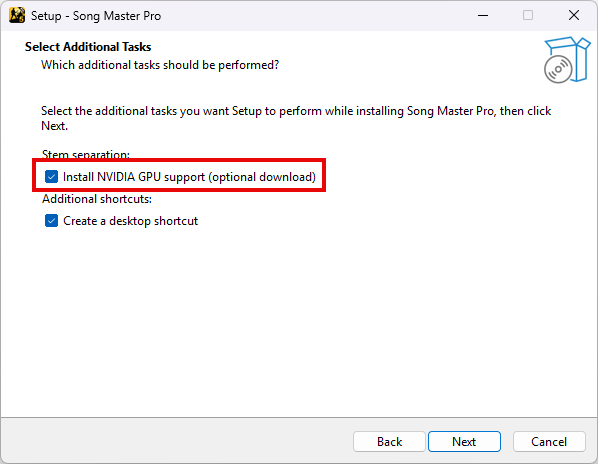
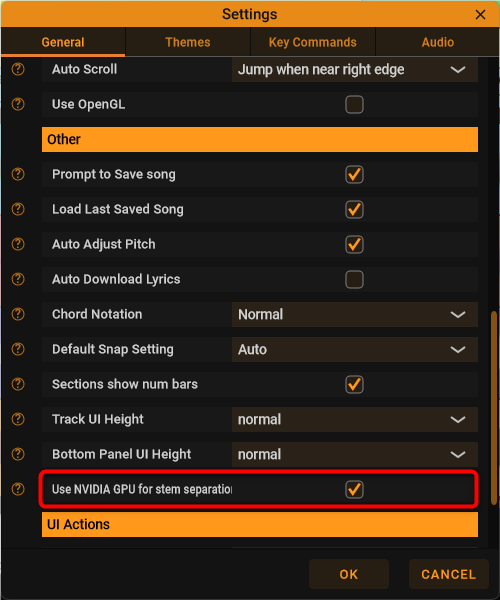
- Accelerate stem separation on supported NVIDIA GPUs on Windows. Select the optional NVIDIA GPU support during installation, then control its use with Use NVIDIA GPU for stem separation in Settings. Newly installed GPU support is detected and enabled automatically.
- Continue separating stems on the CPU on Windows if GPU support is unavailable or GPU processing fails. Speed gains depend on the hardware and selected separation settings.
- Smaller separation models and revised processing reduce model storage and working-memory requirements
- A loading spinner now appears while preparing the stem-separation model, before a useful progress or time-remaining estimate is available.
Drums to MIDI [Pro]
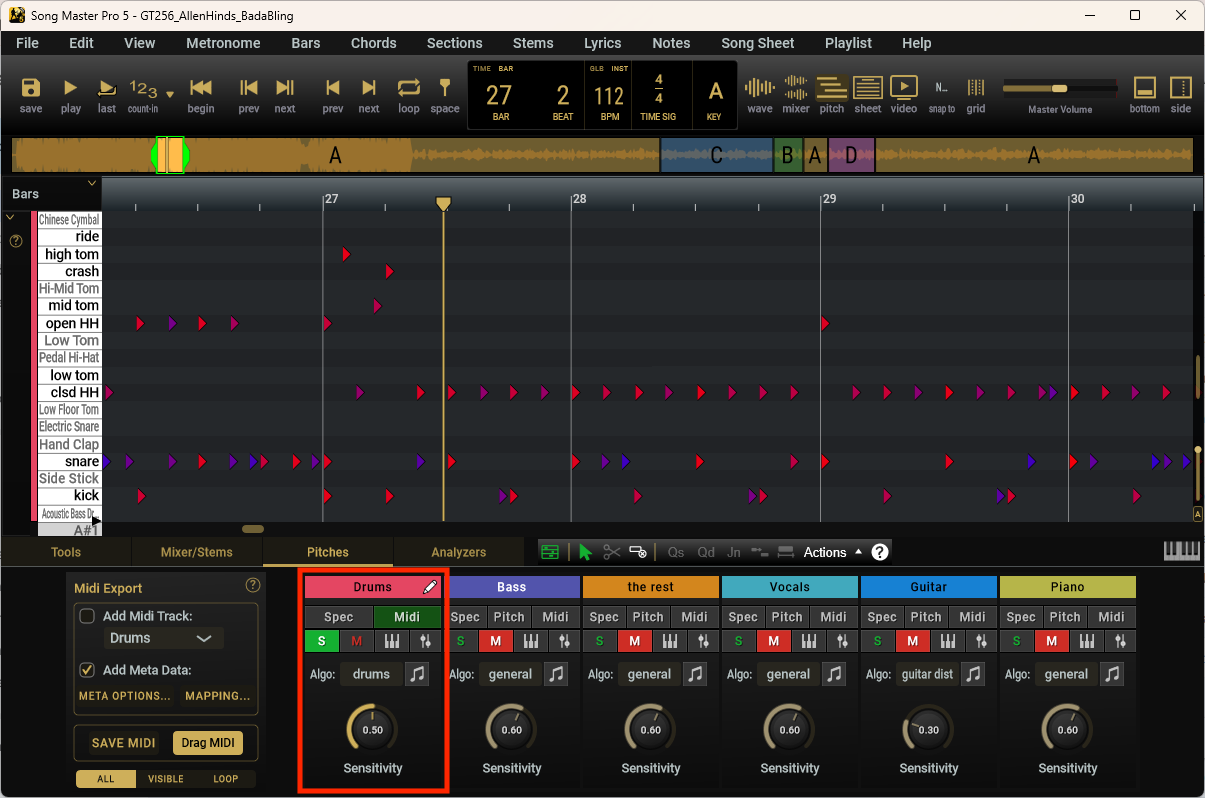
- Convert drum audio into editable MIDI.
- Detects nine drum types: kick, snare, closed and open hi-hat, low/mid/high toms, crash, and ride, with estimated hit velocities and adjustable detection sensitivity.
- Edit drum-hit timing and velocity in a dedicated drum MIDI editor.
- Audition MIDI using built-in drum samples and the onscreen keyboard.
- Save drum performances as MIDI files or drag them into other music software. Choose an export mapping for General MIDI, BFD3, Superior Drummer 3, Addictive Drums 2, EZdrummer 3, Abbey Road 50s–80s, SSD5.5, or MODO DRUM.
- Create, save, and import custom drum mappings
- Export drum tracks to MusicXML using percussion notation.
Zooming in the Pitches view [Pro]
These controls apply to the Pitches view. Vertical zoom now uses Alt + Shift on Windows and Option + Shift on macOS for both pinch and wheel gestures. Shift alone constrains pinch zoom horizontally; the other wheel behavior is unchanged.
Windows precision touchpads may report pinch as wheel input; those gestures follow the wheel rows below.
| Gesture | Hold on Windows | Hold on macOS | Result |
|---|---|---|---|
| Trackpad pinch | No modifier | No modifier | Zoom horizontally and vertically together. |
| Trackpad pinch | Shift | Shift | Zoom horizontally only. |
| Trackpad pinch | Alt + Shift | Option + Shift | Zoom vertically only. |
| Mouse wheel or two-finger scroll | No modifier | No modifier | Zoom horizontally when Mouse Wheel Action is Zoom; scroll horizontally when it is Scroll. |
| Mouse wheel or two-finger scroll | Shift | Shift | Temporarily switch between horizontal zoom and horizontal scrolling. |
| Mouse wheel or two-finger scroll — changed | Alt + Shift | Option + Shift | Zoom vertically only, regardless of Mouse Wheel Action. |
MIDI editing gestures and shortcuts [Pro]
| Action | Windows | macOS |
|---|---|---|
| Change note pitch or drum row while keeping timing fixed — new | Ctrl + drag a note | Command + drag a note |
| Add all notes in a keyboard row to the selection — changed | Shift + click the row label | Shift + click the row label |
| Toggle velocity editing, now also available for drum hits | Ctrl + R | Control + R |
| Make Monophonic — renamed command | Ctrl + O | Control + O |
| Remove Overlap (same row) — renamed command | Ctrl + T | Control + T |
-
Shift-clicking a keyboard row requires MIDI edit mode and replaces the former Shift-drag panning gesture on the keyboard strip. Ctrl-drag on Windows or Command-drag on macOS also overrides velocity editing to move a note between rows while preserving its timing.
-
The velocity and overlap shortcut keys are unchanged. The overlap commands apply to pitched-note tracks. Auto-Fit MIDI Notes is available through the A button below the vertical zoom slider and has no default keyboard shortcut.
Improvements
Beat timing and practice
- Beat analysis now saves individual beats instead of just bar times and interpolating beats from them.
- Bar regrouping and downbeat shifts preserve those detected timings. Snapping, grid display, metronome subdivisions, and navigation use the more precise beat grid, including changing time signatures.
- Choose a Default Snap Setting for new songs in Settings. Existing songs retain their saved snap setting.
- Metronome subdivisions are now saved with each song (formly this was one global setting). New songs use the last subdivision setting.
- Improved responsiveness when dragging markers and working with large beat grids.
MIDI editing and export [Pro]
- Use Auto-Fit MIDI Notes to fit the active track's note range vertically. New analysis results are fitted automatically.
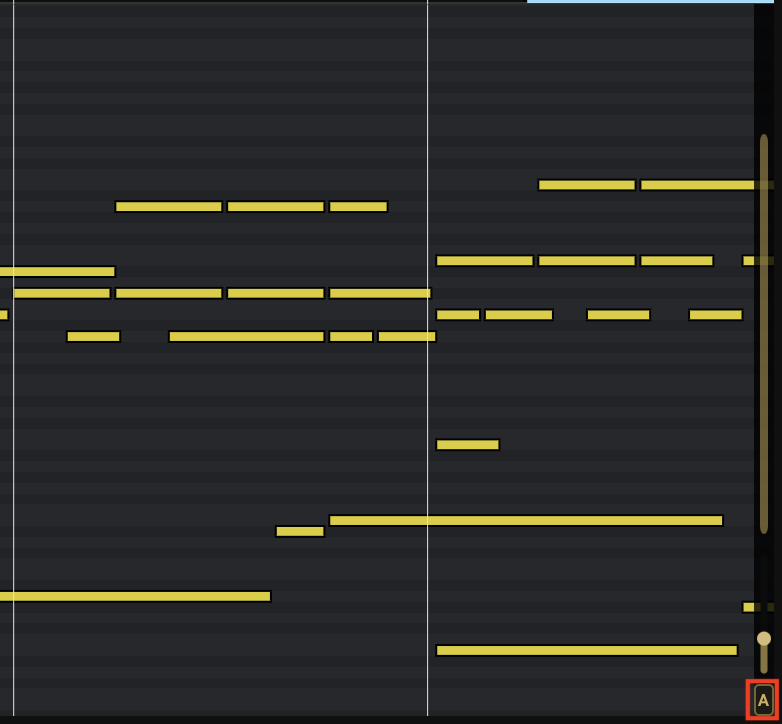
- Velocity editing now shows colour gradients for pitched notes as well as drum hits.
- Active toolbar toggles have clearer visual feedback (green is enabled).
- Faster note rendering, hit testing, and movement of large note selections.
- MIDI tempo-map export now follows individual beat intervals when precise beat data is available, preserving tempo changes within bars.
- Changing the analysis algorithm or reanalyzing a track now makes that track the active editing group.
- Analysis algorithm choices stay with each song. New tracks start with the general algorithm, or the drums algorithm for drum stems, rather than inheriting a choice from another song.
Song Sheet and MusicXML [Pro]
- Set the lyric font size in Song Sheet options, affects PDF export.
- Choose whe ther to include chord names in MusicXML exports.
- Improved MusicXML rhythm and triplet handling, including drum export that respects the selected snap resolution.
- Song Sheet chord and lyric placement follows the more precise beat grid.
- Zoom Song Sheet with either Shift or Control plus the mouse wheel or a two-finger scroll, including over blank areas of the viewport.
- Ctrl+mouse-wheel can now be used to zoom
Browsing and playlists
- The Songs, Audio, and Other browser tabs remember their last browsed folders between sessions.
- Audio and video icons identify playlist entries without cover art, and video files have a dedicated browser icon.
- Finder and Explorer commands now locate the original audio or video source. Showing a packaged song reveals its
.smsongfolder. - Stem-track menus now use Hide Track and Show Track to clarify that tracks are being hidden rather than deleted.
Settings and interface
- Larger tooltip and help text, clearer popup outlines, and updated application icons.
- General Settings now groups File Paths and File/Save Options separately.
- [Pro] New default OSC receive connections start disabled. Enable them in External Connections when needed; existing saved connections keep their settings.
Fixes
- Fixed failure to locate an audio file stored next to its
.songfile. - Fixed Open Stems Folder choosing the wrong location for project-based stems, and regenerated stems remaining hidden because of earlier ignore settings.
- Fixed showing hidden stems before they have been saved to disk, and preserved their audio when saving stems while tracks are hidden.
- Improved playback stability during seeking, looping, and speed or pitch changes, and reduced clicks when starting, stopping, or entering loops with silence.
- Fixed audio being silenced when playback starts before an active loop.
- Fixed playlists advancing unexpectedly when navigating to the end of a song while stopped, such as with Next Section.
- Restoring audio-device settings now uses the device's current sample rate.
- Improved recovery from a failed startup.
- Windows installers now check for the required Visual C++ runtime and install it before offering to launch the application.
- Fixed section-label parsing and saving issues involving special characters, with more reliable restoration of section and subsection data.
- Fixed a crash involving time-signature changes and undo/redo, and corrected restoration of beat and meter information after edits and reopening a song.
- Fixed a crash when importing lyrics with invalid text encoding; unreadable files now produce an explanatory message.
- [Pro] Fixed minor MIDI synchronization issues during looping, seeking, and speed changes; MIDI notes no longer sound during a loop's silent regions.
- [Pro] Fixed selection handling when overlap removal deletes notes. Remove Overlap (Mono) is now named Make Monophonic, and the per-pitch command is named Remove Overlap (same row).
- [Pro] Fixed long notes being unnecessarily divided into chains of short tied notes in MusicXML exports containing triplets.
- [Pro] Fixed the final character of lyrics being clipped in Song Sheet view.
- [Pro] Added clear warnings when saved pitch or note data requires a newer application version, avoiding silent replacement of that data.
- [Pro] Improved MIDI-input shutdown handling.
- [Pro] Fixed onscreen keyboard note colours failing to match renamed tracks or updated label colours.