Using ARA in DAWs
Prism currently supports these DAWs in ARA mode:
- Pro Tools
- Cubase/Nuendo
- Studio One
- Reaper
- Sonar
- Logic Pro on Intel processors
If you are not using one of these DAWs, then this article is probably not for you.
ARA Plugins Are Added to a Track Differently
You don't insert ARA plugins in the same way as you do effect plugins. Each DAW manages this process in slightly different ways so you will have to check with your DAW for details. Basically, some DAWs will apply an ARA plugin to all audio clips in a track (Logic Pro, Reaper, Cubase) while other DAWs (Studio One, Sonar) require you to "apply" the plugin on a per-clip basis.
How to Add ARA Plugins in Major DAWs
Below are quick instructions for inserting ARA plugins inside the most common workstation environments.
Pro Tools
ARA plugins for Pro Tools are added to a track and will be applied to every clip in the track.
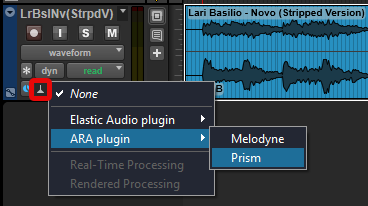
Cubase/Nuendo
mac users will want to install the VST3 version (Cubase/Nuendo do not support ARA from AU plugins).
ARA plugins for Cubase are added to a track and will be applied to every clip in the track.
- Select the Track
- In the Inspector panel (to the right of the Track list), click Extensions and select the ARA plugin from the drop-down.
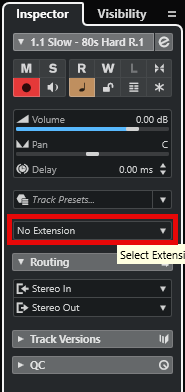
Cubase integrates ARA plugins into the same panel used to display it's own editors.
Reaper
mac users will want to install the VST3 version (Reaper doesn't support ARA from AU plugins).
ARA plugins for Reaper are added to a track and will be applied to every clip in the track.
- In the desired track header, click the FX button
- Find the plugin in the list and click it (use the search bar to quickly find the plugin).

Reaper gives each ARA plugin it's own stand-alone window.
Studio One
mac users will want to install the VST3 version (Studio One doesn't support ARA from AU plugins).
ARA plugins are added to individual clips (not an entire track).
- Right-click any audio event/clip.
- Expand the sub-menu for Event FX and select the ARA plugin
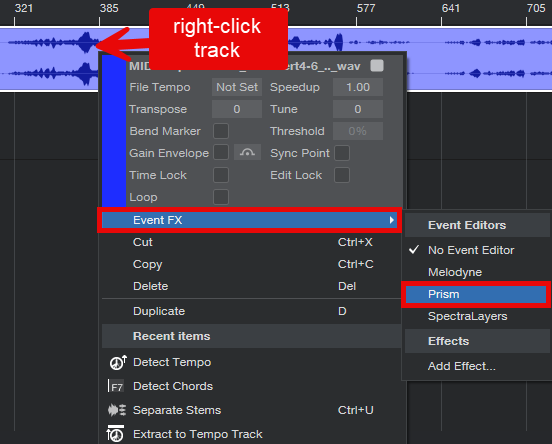
Studio One integrates ARA plugins into the same panel used to display it's own editors.
Adding Prism to a Track in Logic Pro
Logic Pro only supports AU plugin formats so be sure to install Prism's AU plugin.
- Select the Track
- In the Track panel displayed to the left, click "Audio FX" and select the Prism plugin.
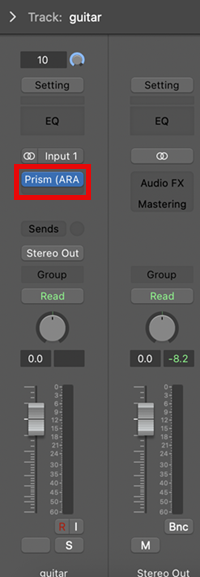
Logic Pro and ARA Mode
Prism supports ARA mode in Logic Pro however, Logic Pro only supports ARA on Intel processors. If you are running Logic on Apple Silicon processor, Prism will load as a normal non-ARA plugin and work just fine. This section is only if you really want to run in ARA plugins in Logic--it's probably NOT worth the trouble.
If your processor is Intel, then Prism will load in ARA mode.
The only advantage that ARA mode has over non-ARA is that in non-ARA mode, you have to play audio into Prism before it can analyze it.
If you have an Apple Silicon processor, you can run Prism in ARA mode but you have to run Logic under Rosetta which will disable some newer features in Logic.
If you really want to run Logic in ARA Mode on Apple Silicon
You first need to run Logic under Rosetta:
- Close Logic
- Find Logic in your Applications folder, and right-click the Logic Pro icon ad select Get Info
- Check the "Open using Rosetta" box
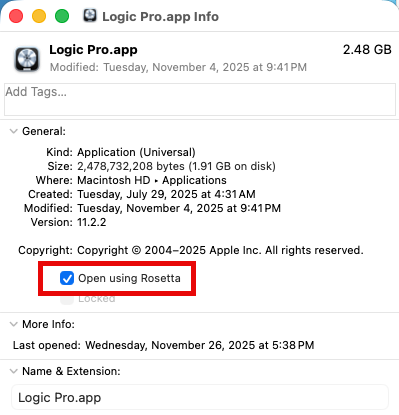
You insert Prism into an audio track just like you do for normal plugins. However, unlike other DAWs, Logic is a bit quirky with ARA plugins and you won't see any results in the ARA plugin window until you press Play. Once Play is pressed, Logic passes info to the ARA plugin so it can analyze the audio.
Since Rosetta runs Intel code, it is important that you install Prism for mac Intel (Prism will not show up if you installed Prism for Apple Silicon when running under Rosetta).
If you initially installed the Apple Silicon AU Prism plugin, then you will need to manually remove the AU plugin before installing the Intel version:
- /Library/Audio/Plug-Ins/Components
If present, you want to delete Prism.component from one of the above folders.
Sonar
ARA plugins are added to clips (not for an entire track).
- Right-click the region/clip
- Expand the Region FX submenu
- Choose the ARA plugin and select Create Region FX
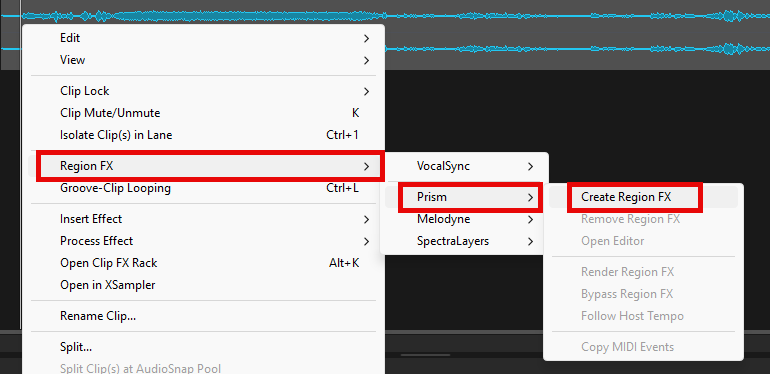
Cakewalk integrates ARA plugins into the same panel used to display it's own editors.